Blame
|
1 | # VM iGPU Passthrough |
||||||
|
2 | |||||||
|
3 | ## Working setup |
||||||
|
4 | |||||||
|
5 | The following shows the versions that are known to be working at the time of writing: |
||||||
| 6 | ||||||||
| 7 | | Hardware | Host | Guest | |
|||||||
| 8 | | -------- | -------- | -------- | |
|||||||
|
9 | | Bosgame M5<br>AXB35-02 SixUnited<br>BIOS 1.07 | [Proxmox 9.1](https://www.proxmox.com/en/downloads)<br>Kernel 6.17.4-1-pve | [CachyOS](https://cachyos.org)<br>Kernel Linux 6.18.2-3-cachyos<br>Mesa Mesa 25.3.2-arch1.2<br>Vulkan 1.4.335 | |
||||||
|
10 | |||||||
| 11 | CachyOS is not necessarily needed, but it's a convenient way to get a rolling distro in a friendly way. Once you've got it working, it's much easier to know if it's a guest issue. |
|||||||
| 12 | ||||||||
| 13 | ### Setting Up |
|||||||
|
14 | |||||||
|
15 | There are various guides out there, but the following gives precise instructions that result in a *confirmed working* setup with iGPU passthrough. |
||||||
|
16 | |||||||
|
17 | 1. Install Proxmox 9.1 and run an apt dist-upgrade after installing. Ensure you have kernel 6.17.4 or later |
||||||
| 18 | 2. Setup the following config |
|||||||
|
19 | ```bash |
||||||
| 20 | # /etc/kernel/cmdline |
|||||||
|
21 | ... initcall_blacklist=sysfb_init |
||||||
|
22 | ``` |
||||||
| 23 | ||||||||
| 24 | ||||||||
| 25 | ```bash |
|||||||
|
26 | # /etc/modprobe.d/pve-blacklist.conf |
||||||
|
27 | blacklist radeon |
||||||
| 28 | blacklist amdgpu |
|||||||
| 29 | blacklist snd_hda_intel |
|||||||
| 30 | ``` |
|||||||
| 31 | ||||||||
| 32 | ```bash |
|||||||
| 33 | # /etc/modprobe.d/vfio.conf |
|||||||
| 34 | options vfio-pci ids=1002:1586,1002:1640 disable_vga=1 |
|||||||
| 35 | ``` |
|||||||
| 36 | ||||||||
|
37 | 3. Create a VM. Settings don't matter too much for now, but ensure the following: |
||||||
| 38 | - 32GB memory, no baloon |
|||||||
| 39 | - 'host' setting on CPU arch |
|||||||
| 40 | - q35 machine |
|||||||
| 41 | - Use the latest CachyOS desktop ISO |
|||||||
| 42 | ||||||||
| 43 | Do *NOT* yet try to passthrough any devices |
|||||||
| 44 | ||||||||
| 45 | 4. Boot the VM and install Cachy via the Proxmox console. |
|||||||
| 46 | 5. Open a shell within Cachy and type "update", to get the latest. |
|||||||
| 47 | 6. Edit the config of vi /etc/pve/qemu-server/100.conf and add these lines, but making sure the devices match the output of lspci on your particular machine: |
|||||||
| 48 | ``` |
|||||||
| 49 | hostpci0: 0000:c5:00.0,pcie=1,romfile=vbios.bin,x-vga=1 |
|||||||
| 50 | hostpci1: 0000:c5:00.1,pcie=1,rombar=0 |
|||||||
| 51 | hostpci3: 0000:c5:00.4,pcie=1,rombar=0 |
|||||||
|
52 | ``` |
||||||
| 53 | ||||||||
|
54 | Note that the last one is a USB controller - you'll need to plugin a keyboard and mouse initially. Also not that you *do not* need a BIOS for the audio device. |
||||||
| 55 | ||||||||
| 56 | 7. Extract your *own* VBIOS according to https://github.com/isc30/ryzen-gpu-passthrough-proxmox?tab=readme-ov-file#configuring-the-gpu-in-the-windows-vm. There's no guarantee someone else's VBIOS will work for you. |
|||||||
| 57 | ||||||||
| 58 | After that, you should now be able to start the VM, and CachyOS will show up on your monitor. |
|||||||
| 59 | ||||||||
| 60 | ## USB passthrough |
|||||||
| 61 | ||||||||
| 62 | As noted above, in order to use a desktop environment, you can passthrough a USB controller. On the Bosgame M5, the USB controller in the same group as the iGPU is the physical USB 3 port at the back, next to the power supply connector. It might not start with "5" |
|||||||
| 63 | ||||||||
| 64 | ||||||||
|
65 | Proxmox VM: |
||||||
|
66 | 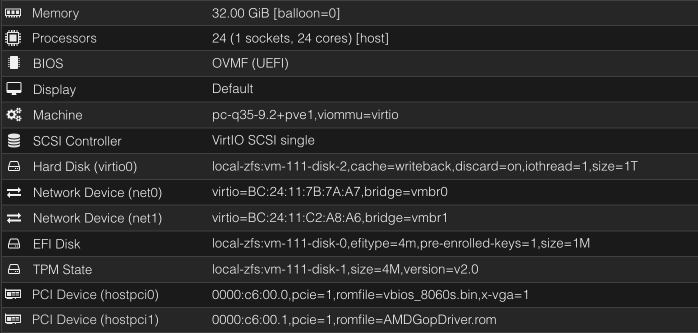 |
||||||
| 67 | ||||||||
|
68 | ### Windows VMs |
||||||
|
69 | - hardware IDs are `1002:1586` (iGPU) and `1002:1640` (audio) |
||||||
|
70 | - the 'reset bug' is here, I found no way to avoid it, so **you can passthrough the iGPU to a Windows guest only once per boot of the host** |
||||||
|
71 | - don't bother with `vendor-reset` module and/or `RadeonResetBugFix` service, they are severely outdated and don't do anything in our case |
||||||
|
72 | - if your VM crashes during GPU driver install, switch the CPU type to something generic (`x86-64-v4` for example seems to work fine), install the driver, then return it back to `host` |
||||||
|
73 | - if you see unknown PCI device (`1af4:1057`) in your Device Manager, install `viomem` driver manually from virtio drivers ISO |
||||||
|
74 | - set the fixed VRAM amount in the BIOS and never change it on the OS level, otherwise expect major slowdowns and crashes |
||||||
|
75 | - [this issue](https://github.com/isc30/ryzen-gpu-passthrough-proxmox/issues/112) might be worth looking into |
||||||
| 76 | ||||||||
|
77 | ### Linux VMs |
||||||
| 78 | - the guide and configuration are valid for Linux too |
|||||||
| 79 | - Proxmox 9 seems to be a must to avoid the reset bug |
|||||||
| 80 | - use recent kernels (6.15+), if you see amdgpu driver errors during boot most likely your kernel is too old |
|||||||
| 81 | - just like with Windows, dynamic VRAM allocation seems to be very unstable, set the fixed amount in the BIOS |
|||||||
| 82 | ||||||||
|
83 | ### Additional Info (Discord) |
||||||
| 84 | - [my personal experience and why I gave up on the idea of the iGPU passthrough](https://discord.com/channels/1384139280020148365/1384139280632250492/1430532693208334368) |
|||||||
| 85 | - [a discussion thread with additional links for LXC passthrough](https://discord.com/channels/1384139280020148365/1425880739638939770) |
|||||||
| 86 | ||||||||
|
87 | ### Forums |
||||||
| 88 | ||||||||
| 89 | The following forums can help with Proxmox and passthrough issues in general: |
|||||||
| 90 | ||||||||
| 91 | - Reddit |
|||||||
| 92 | - https://www.reddit.com/r/Proxmox/ |
|||||||
| 93 | - https://www.reddit.com/r/VFIO/ ("VFIO" stands for "Virtual Function I/O", and is the tech behind hardware pasthrough) |
|||||||
| 94 | ||||||||
| 95 | - Proxmox https://forum.proxmox.com |
|||||||
| 96 | ||||||||
| 97 | ||||||||
| 98 | ### Other guides |
|||||||
| 99 | ||||||||
| 100 | This guide seems to work for Strix Halo: |
|||||||
| 101 | https://github.com/isc30/ryzen-gpu-passthrough-proxmox |
|||||||
| 102 | ||||||||
| 103 | There's also a guide from a Framework Desktop owner available here: |
|||||||
| 104 | https://community.frame.work/t/anyone-using-proxmox-ve/74863/6?u=beralt |
|||||||
| 105 | ||||||||
|
106 | ### Files |
||||||
|
107 | |||||||
| 108 | ||||||||
|
109 | (taken from [[EVO-X2|Hardware/PCs/GMKtec_EVO-X2]], BIOS version 1.04) |
||||||
|
110 | - [vbios_8060s.bin](./vbios_8060s.bin) |
||||||
| 111 | - [AMDGopDriver.rom](./AMDGopDriver.rom) |
|||||||