Power Mode and Fan Control
Problem
No fan and power mode control is available is available for Linux or Windows on Sixunited's AXB35 board.
Solution for Linux
There is a ec-su_axb35-linux kernel module written by Christoph Metz.
It allows you to:
- read current fan speeds and modes
- switch modes of each of the three available fans
- control fan speed in
fixedmode - control fan speed with custom curves in
curvemode - read current power mode
- change current power mode
- read current APU temperature
Generic Installation (no secure boot)
- Install module building dependencies (depends on your distro, on debian/ubuntu install
build-essentialandlinux-headers-$(uname -r)packages). - Clone the repo with
git clone https://github.com/cmetz/ec-su_axb35-linux.git. - Build and install the module with
cd ec-su_axb35-linux && sudo make install. - Try loading the module with
modprobe ec_su_axb35and check yourdmesgafterwards. You should see theSixunited AXB35-02 EC driver loadedmessage. - Run
scripts/info.shand check that all information is there. - Run
scripts/test_fan_mode_fixed.sh, it should test your fans on all 6 fixed levels. - If everything is good, you can make the module automatically load on system boot with
sudo echo ec_su_axb35 >> /etc/modules. If it says "permission denied", drop into root console withsuorsudo su -and try again.
The equivalent of the above steps for Fedora is:
# Install module building dependencies
sudo dnf group install -y development-tools c-development
sudo dnf install -y kernel-headers

# Clone the repo
git clone https://github.com/cmetz/ec-su_axb35-linux.git /tmp/ec-su_axb35-linux
cd /tmp/ec-su_axb35-linux
sudo make install

sudo modprobe ec_su_axb35
echo 'ec_su_axb35' | sudo tee /etc/modules-load.d/ec_su_axb35.conf >/dev/null

dmesg | grep 'Sixunited AXB35-02 EC driver loaded'
Installation with secure boot on Fedora
Check that secure boot is enabled:
$ mokutil --sb-state
SecureBoot enabled
Generate a new self-signed certificate for MOK and request it to be added to your UEFI keys:
sudo dnf install dkms openssl sbsigntools
sudo dkms generate_mok
MOK_PASSWD=test1
sudo mokutil -i /var/lib/dkms/mok.pub << EOI
${MOK_PASSWD}
${MOK_PASSWD}
EOI
sudo systemctl reboot
During reboot the blue Shim UEFI key management screen appears. Press a key. Select “Enroll MOK”, choose “Continue”, select “Yes”, enter the password "test1" from above. Note that the password must be no more than 5 characters long. Your keyboard will probably be in a US keyboard layout at this point.
Build the ec_su_axb35 kernel module:
git clone https://github.com/cmetz/ec-su_axb35-linux.git
cd ec-su_axb35-linux
make
sudo make install
Sign the kernel module file you just compiled and then load it (as root):
/usr/src/kernels/$(uname -r)/scripts/sign-file sha256 /var/lib/dkms/mok.key /var/lib/dkms/mok.pub /lib/modules/$(uname -r)/updates/ec_su_axb35.ko
modprobe ec_su_axb35
dmesg|tail
Hopefully you will see this:
[  123.02] ec_su_axb35: loading out-of-tree module taints kernel.
[  123.03] ec_su_axb35: Sixunited AXB35-02 EC driver loaded
… and you're done! Note that you will have to redo the steps (compiling and signing) for every new Linux kernel version.
Usage
Reading and writing all of the parameters happens through sysfs with /sys/class/ec_su_axb35 path. You can find detailed information in the repo's readme file.
Some examples:
cat /sys/class/ec_su_axb35/fan2/rpmto get current rpm of fan2echo fixed > /sys/class/ec_su_axb35/fan3/mode && echo 2 > /sys/class/ec_su_axb35/fan3/levelto switch fan3 to fixed mode and set speed to level 2echo balanced > /sys/class/ec_su_axb35/apu/power_modeto set power mode to balanced (85W)
You can also call su_axb35_monitor anywhere to monitor all available values in realtime:
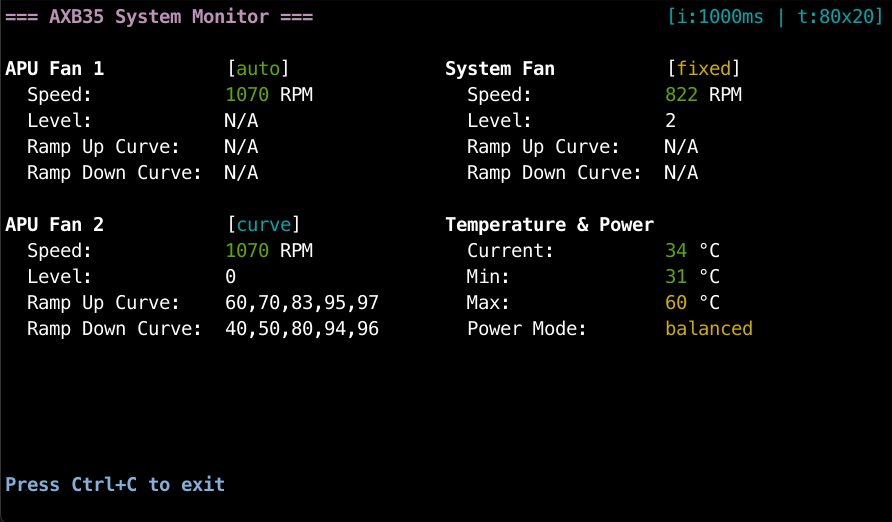
To apply specific settings at system startup, place them in your rc.local file or utilize any other methods for executing commands during boot, such as creating a systemd unit. In the future, these parameters will also be configurable through module options.
Custom Curves
The custom curves define temperature thresholds for fan power levels:
- Ramp-up curve (
/sys/class/ec_su_axb35/fanX/rampup_curve): temperature points where fan increases to the next level - Ramp-down curve (
/sys/class/ec_su_axb35/fanX/rampdown_curve): temperature points where fan decreases to the previous level
For example, with these settings:
rampup_curve = 60,70,83,95,97rampdown_curve = 40,50,80,94,96
When CPU is heating up:
- Below 60°: Fan at level 0 (minimum)
- At 60°: Increases to level 1
- At 70°: Increases to level 2
- At 83°: Increases to level 3
- At 95°: Increases to level 4
- At 97°: Increases to level 5 (maximum)
When CPU is cooling down:
- Above 96°: Fan stays at level 5
- Below 96°: Decreases to level 4
- Below 94°: Decreases to level 3
- Below 80°: Decreases to level 2
- Below 50°: Decreases to level 1
- Below 40°: Decreases to level 0
This creates a buffer at each level that prevents the fan from rapidly switching between speeds when temperature fluctuates around threshold values.
Curves are being applied only when curve mode is set on a specific fan, each fan has their own curves.
Solution for Windows
Based on the research made for the Linux module a Windows implementation has been written as well. The only major limitation is the need to disable Secure Boot, everything else should be pretty simple, just follow the readme in the repo.
Fine-tuning Power Limits
If you want more gradual control over power modes, there's a RyzenAdj utility (or UXTU for Windows).
Main 3 parameters we are interested in are:
STAPM LIMIT(sustained power draw)PPT LIMIT FAST(boost power draw)PPT LIMIT SLOW(average power draw)
Default values on all 3 selectable power modes (use ryzenadj --info to read them):
| Power Mode | STAPM LIMIT | PPT LIMIT FAST | PPT LIMIT SLOW |
|---|---|---|---|
| Quiet | 54.0 | 100.0 | 54.0 |
| Balanced | 85.0 | 120.0 | 120.0 |
| Performance | 120.0 | 140.0 | 120.0 |
Example on setting the power limit to static 100W with no boost:
ryzenadj --stapm-limit=100000 --fast-limit=100000 --slow-limit=100000
Note that changing the power mode via the EC controller (using ec-su_axb35-linux or otherwise) resets these values to their defaults.
Relevant Pages
Created 2025-11-29 15:43:03 by deseven.